In a first, scientists have invented a battery electrode that heals itself, paving way for next generation of long-lasting batteries for electric cars, cell phones and other electronic devices.
The self-healing electrode is madesilicon microparticles that are widely used in the semiconductor and solar cell industry.
The secret behind the invention is a stretchy polymer that coats the electrode, binds it together and spontaneously heals tiny cracks that develop during battery operation, according to Stanford University researchers and colleagues.
Chao Wang, a postdoctoral researcher at Stanford and one of two principal authors of the paper, developed the self-healing polymer in the lab of Zhenan Bao, a professor of chemical engineering at Stanford, whose group has been working on flexible electronic skin for use in robots, sensors, prosthetic limbs and other applications.
For the battery project, Chao added tiny nanoparticles of carbon to the polymer so it would conduct electricity.
"We found that silicon electrodes lasted 10 times longer when coated with the self-healing polymer, which repaired any cracks within just a few hours," Bao said.
The electrodes worked for about 100ge-discharge cycles without significantly losing their energy storage capacity.
"That's still quite a waythe goal of about 500 cycles for cell phones and 3,000 cycles for an electric vehicle," Yi Cui, an associate professor at Stanford said, "but the promise is there, andall our data it looksit's working."
Researchers worldwide are racing to find ways to store more energy in the negative electrodes of lithium ion batteries to achieve higher performance while reducing weight.
To make the self-healing coating, scientists deliberately weakened some of the chemical bonds within polymers - long, chain-like molecules with many identical units.
The resulting material breaks easily, but the broken ends are chemically drawn to each other and quickly link up again, mimicking the process that allows biological molecules such as DNA to assemble, rearrange and break down.
The researchers said they think their approach could work for other electrode materials as well, and they will continue to refine the technique to improve the silicon electrode's performance and longevity.
The study appears in the journal Nature Chemistry.
Samsung, which launched the world's first smartphone with a curved screen last month, is now reportedly developing a smartphone with a wraparound screen.
The screen of this phone wraps around the edges so users can view messages while viewing from an angle and each side of the display works independently.
The South Korean manufacturer's wraparound screen smartphone would be using an upgraded version of its Youm technology, which was showcased in January this year. This display technology is also used in Galaxy Round, the company's only curved screen smartphone.
Bloomberg's report, citing two sources close to the development, said: "The display may be used in the S or Note series of premium handsets or may be the first in a new line."
However, the report was unclear about the launch date of the device. Samsung doesn't have a specific release date for the new device, but the handset is more likely to come out during the second half of next year.
Samsung has already revealed its roadmap for smartphones, saying it will launch handsets with bendable touchscreens next year and models with foldable displays in late 2015 or 2016.
Other companies are also working on new display technologies to compete in the booming smartphone market. Soon after Samsung launched the world's first handset with a curved screen, LG had launched a similar smartphone, named G Flex.
Apple too is reported to be planning a curved screen iPhone next year that may feature a larger display than its earlier variants. Apple is also said to be working on a curved screen smartwatch.
You may never need to memorize another password. That's the goal of researchers at Purdue University's International Center for Biometrics Research.
Stephen Elliott is the director of international biometric research at Purdue University in Indiana. He says iris and fingerprint scans as well as facial and voice recognition are just a few of the tools that improve security while making lives easier.
His basement lab is a placeemerging biometric technologies are tested for weaknesses before they can go mainstream.
Biometrics is already in use at one local restaurant. Chris Smith, assistant manager of KFC in West Lafayette, Indiana, says workers punch in by putting their finger on a fingerprint scanner attached to their cash register.
If you live in a free and democratic society, the idea that someone can control your browsing choices probably is quite disturbing. Employers blocking Facebook during working hours may be acceptable. What a free society should completely oppose, however, is censorship based on someone else's moral code, religious belief or political ideology.
Irrespective of who does the censoring, the methods used are more or less the same. This article examines some of the most common methods used to filter content as well as emerging trends. In each case, I have provided a solution or practical workaround.
The current state of internet censorship
The internet is being censored in several countries around the world. Over a billion people — 20% of the global population — are affected. Due to its large population of internet users (over 500 million), China is the best known culprit, but certainly not the worst. Our Information Liberation Guide by Jim Rion has some useful information on global internet censorship and lists the following countries as the worst violators: North Korea, China, Iran and Saudi Arabia.
Other countries not well known for internet censorship include Bahrain, Belarus, Burma, Cuba, Syria, Uzbekistan, Turkmenistan and Vietnam.
Internet censorship isn't limited to oppressive regimes. For example, it is common practice for educational institutionsover the world to implement filtering of content deemed objectionable. Companies and institutions also do the same. Many public Wi-Fi access points block pornography or material based on hate and violence. Maybe you have also used public Wi-Fi hotspotsaccess to streaming media sites was blocked and file downloads were restricted. Clearly, the internet isn't free.
The methods used for internet censorship
IP Blocking
This is the most basic method used to filter content. It involves blocking the IP address of the target website. Unfortunately,websites sharing the same IP address, which is usually the case on a shared hosting server, are also blocked. This was the method used by ISPs in the UK to block The Pirate BayWorkaround:you need is a proxy with access to the blocked site. There are numerous free proxies online. This article by Guy McDowell lists four sites that give you a free updated proxy list. The proxy server fetches the website for you and displays it on your browser. Your ISP only sees the IP address of the proxy and not the blocked website. Blocked websites can also beat this censorship method by adding a new IP address and letting users know about it. Users are then able to access the site without any problems.
DNS filtering and redirection
This is a much more sophisticated filtering methodthe Domain Name Server (DNS) fails to resolve the correct domain or returns an incorrect IP address. ISPs in many countries use this method to block illegal sites, for example, Denmark and Norway use DNS filtering to block child porn websites. China and Iran have also used this method numerous times in the past to block access to legitimate sites. Read Danny's article on how to change your DNS for more in-depth information.
Workaround: One way to circumvent this is to find a DNS that resolves the domain name correctly, for example, OpenDNS or Google Public DNS. To change your DNSyour ISP to OpenDNS or Google Public DNS, you must configure it in your operating system or device. Both have excellent tutorials fortypes of operating systems. You can also type the numeric IP address in your URL bar instead of the actual domain name though this is less effective especiallysites share IP addresses.
URL filtering
With URL filtering, the requested URL is scanned for targeted keywords irrespective of the actual domain name typed in the URL. Many popular content control software and filters use this method. Typical users include educational institutions, private companies and government offices.
Workaround: A highly technical method to circumvent this is to use escapeacters in the URL. However, it is much simpler to use encrypted protocols such as a Virtual Private Network (VPN) service or Tor. Once the data is encrypted, the filter cannot scan the URL and you can therefore access any website.
Packet filtering
This method is also known as static packet filtering. It is a firewall technique used to control network access. Incoming and outgoing data packets are monitored and either stopped or allowed through based on pre-determined rules such as source and destination IP addresses, keywords and ports. When used in internet censorship, TCP packet transmissions are terminated by the ISP when targeted keywords are detected.
Workaround: Again, VPN services and Tor are the best ways to get around packet filtering. Packets sent over VPN and Tor contain dual IP headers. Firewalls are only able to apply the filtering rules to the outer header but not the inner header when these data packets are transmitted.
Man-in-the-middle (MITM) attack
I have only heard of this method being used by some of the regimes I mentioned earlier. It is a common hacking method, but in January 2010, Chinese authorities successfully used a MITM attack to intercept and track traffic to Github.com. As the name implies, an MITM attack is based on impersonation,the eavesdropper makes independent connections with the victims and makes them believe they are communicating with one another.
Workaround: The best defense against MITM attacks is to use encrypted network connections, such as offered by HTTPS (what is HTTPS?) and VPN. HTTPS utilizes SSL capabilities in your browser to conceal your network trafficsnooping eyes. There are Chrome and Firefox extensions known as HTTPS Everywhere, that encrypts your communication on most major sites. When browsing on HTTPS, always take note of any browser warnings to the effect that a website's certificate is not trusted. This could indicate a potential MITM attack. VPN and Tor technology also uses SSL, which forces the attacker to obtain the key used to encrypt the traffic.
TCP connection resets/forged TCP resets
In this method, when a TCP connection is blocked by an existing filter,subsequent connection attempts are also blocked. It is also possible for other users or websites to be blocked, if network traffic is routed via the location of the block. TCP connection resets were originally used by hackers to create a DOS (Denial of Service) condition, but Internet censors in many countries are increasingly finding the technique useful to prevent access to specific sites. In late 2007, it was reported that Comcast used this method to disable peer-to-peer communication. The US FCC ordered Comcast to terminate the practice in August 2008.Workaround: The workaround for this mainly involves ignoring the reset packet transmitted by the firewall. Ignoring resets can be accomplished by applying simple firewall rules to your router, operating system or antivirus firewall. Configure your firewall to ignore the reset packet so that no further action or response is taken on that packet. You can take this a step further by examining the Time-to-live (TTL) values in the reset packets to establish if they are cominga censorship device. Internet users in China have successfully used this workaround to beat the Great Firewall of China.
Deep Packet Inspection (DPI)
Now this one is really scary. Under the wings of the PRISM project, the NSA used this method to eavesdrop and read private email communications. China and Iran use deep packet inspection for both eavesdropping and Internet censorship. DPI technology allows prying eyes to examine the data part of a packet to search for non-compliance against pre-determined criteria. These could be keywords, a targeted email address, IP address or a telephone number in the case of VoIP. While DPI was originally used to defend against spam, viruses and system intrusion, it is clearrecent developments that it is a now a weapon of choice for Internet censorship.
Workaround: To beat a Deep Packet Inspection, you need to connect to a remote server using a secure VPN link. The Tor Browser bundle is ideal to evade deep packet inspection because it conceals your location or usageanyone carrying out network surveillance or traffic analysis.
Conclusion & Outlook
I have mentioned VPN and Tor as a workaround to most forms of internet censorship. However, I need to issue a caveat. Recent developments in China have demonstrated that even VPN can be blocked. In late 2012, it was widely reported that the Great Firewall of China is now able to learn, discover and block encrypted network trafficseveral VPN systems (not all). China Unicom, one of the largest ISPs in China, is now terminating connections whenever an encrypted connection is detected.
However, it is clear that the there is an intense contest pitting VPN firms against internet censors with each trying to stay ahead. It is a cat-and-mouse game with the VPN companies just managing to stay above water - afterthat is what we pay them to do. For complete anonymity online, though, nothing beats Tor. The NSA, in documents leaked to The Guardian, has admitted that Tor is hands down "the king of high-secure, low-latency internet anonymity."
Finally, future attempts at censorship appear aimed at hacking desktops, tablets and smartphones to embed blocking software directly in users' devices. Moving forward, powerful antivirus and anti-spyware will prove to be a sensible investment.
Scientists, including one of India-origin, claim to have developed a new 'inkblot' password system that could provide near-unbreakable layer of security against on-line password thefts.
The new password system called GOTCHA developed at the Carnegie Mellon University could secure high-value information such as bank accounts - even if the password leaks as part of a large-scale site breach.
To create a GOTCHA, a user chooses a password and a computer then generates several random, multi-coloured inkblots.
The user describes each inkblot with a text phrase. These phrases are then stored in a random order along with the password.
When the user returns to the site and signs in with the password, the inkblots are displayed again along with the list of descriptive phrases; the user then matches each phrase with the appropriate inkblot.
"These are puzzles that are easy for a human to solve, but hard for a computer to solve, even if it has the random bits used to generate the puzzle," said Jeremiah Blocki, who worked on the system along with professor Manuel Blum, and Anupam Datta, associate professor of computer science.
These puzzles would prove significant when security breaches of websites result in the loss of millions of user passwords - a common occurrence that has plagued such companies as LinkedIn, Sony and Gawker.
These passwords are stored as cryptographic hash functions, in which passwords of any length are converted into strings of bits of uniform length.
A thief can't readily decipher these hashes, but can mount what's called an automated offline dictionary attack.
Computers today can evaluate as many as 250 million possible hash values every second, Blocki noted.
Given the continued popularity of easy passwords, such as "123456" or "password," it's not always difficult to crack these hashes. But even hard passwords are vulnerable to the latest brute force methods, Blocki said.
In the case of a GOTCHA, however, a computer programme alone wouldn't be enough to break into an account.
"To crack the user's password offline, the adversary must simultaneously guess the user's password and the answer to the corresponding puzzle," Datta said.
"A computer can't do that alone. And if the computer must constantly interact with a human to solve the puzzle, it no longer can bring its brute force to bear to crack hashes," said Datta.
Because the user's descriptive phrases for inkblots are stored, users don't have to memorise their descriptions, but have to be able to pick them outa list.
There are certain problems we all deal with every day, but don't know why. Why do I need to keep resetting my router? Do I have a virus? What happens when a site I use gets "hacked?" Whether you're the tech-savvy friend that's always answering these questions or the friend doing the asking, here are the answers to the most common conundrums.
10. How Do I Keep My Laptop's Battery In Good Health?
You've probably heard some people say you should drain your battery completely before charging it, or that you should keep it between 40% and 80% all the time to make it last longer. A lot of this is confusion over how batteries used to work, not how they work today. Luckily, most or all of your gadgets these days run on Lithium Ion batteries, which are easy to take care of. We recommend reading our full guide on how they work, but the gist is: they last longer when you perform shallow discharges, keep them cool, and don't leave them plugged in while they're running at 100% battery. Honestly, though, batteries have a finite life no matter what, and your efforts will only go so far-so don't stress about it. Focus your efforts on getting better battery life out of your iPhone, Android phone, or laptop on a given charge instead.
9. What do Viruses, Trojans, and Other Malware Actually Do?
Everyone knows viruses and trojans are bad, but a lot of people don't know how exactly they work. Viruses, for example, are programs that copy themselves and infect a computer, spreading from one to another-just like, well, a real life virus. Trojans, on the other hand, are applications that look normal, but secretly have code that's doing something else-like letting someone else control your computer. We highly recommend reading this explanation for more detail on the different types of malware, as well as the biggest myths surrounding them. And, as always, make sure you're running a good antivirus program-even if you have good browsing habits. Image by Pavel Ignatov (Shutterstock).
8. What's Wrong with Using Public Wi-Fi?
Most of us put a lot of effort into finding free Wi-Fi, but public Wi-Fi networks have their own share of problems-particularly that it's very insecure. Even if a Wi-Fi network has a password, that doesn't keep you safe from other people on the network. It's notoriously easy for any of them to see what you're doing and, in some cases, steal personal information or passwords. Luckily, there's a lot you can do to stay safe, whenever you're on a public network, and you should be a-ok. Photo by Ken Hawkins.
7. Do I Really Need to "Eject" USB Drives?
Ever wonder why your computer warns you about ejecting those USB drives before you remove them? It's because computers use something called write caching to improve performance-if you copy something to your drive, sometimes it'll tell you it's completed the task, but it's actually waiting until it has a few other tasks to perform so it can do them all at once. When you press eject, it finishes anything in the queue to make sure you don't yank it out before it's done. Windows does a better job of avoiding problems than OS X and Linux, but we recommend ejecting all your drives anyway. It's small price to pay for avoiding lost data. While we're on the subject: if you've ever wondered why your external drives never have as much space as the box claims they do, we've got answers for that as well. Photo by Ambuj Saxena.
6. How Can I Tell if an Email Is Spam?
Some spam is obvious ("I lost 30 pounds and made $24356 in five hours by taking this special pill!"), but other messages are more subtle. A lot of spam relies oh "phishing," in which a spammer will try to make their email look like it's coming from a legitimate source. They may tell you to click a link that looks like it's going to paypal.com, but really goes to their PayPal-disguised site where you willingly type in your information. Luckily, you can usually avoid those tricks by checking the URL and typing it in yourself instead. Be careful, too-sometimes those links will cause you to unknowingly spam one of your friends, too. Image by Dejan Stanisavljevic(Shutterstock).
5. Why Are Cables So Gosh Darn Expensive?
So you've bought yourself a shiny new Blu-Ray player, but you need an HDMI cable to go with it. The Best Buy employee hands you a cable and-what the crap-it's $40?! But you buy it grudgingly because you need it. Well, never again: the reason those cables are so expensive? Because they know you'll buy it anyway. The truth is, back in the old days, cables with gold-plated connectors or fancy shielding actually produced a better picture, but with modern digital cables-like HDMI, USB, and others-things are much simpler (and cheaper). A cheap cable from Monoprice will work just as well, so don't waste your money. While you're at it,buy refurbished and skip the extended warranty if you want to save even more money on your tech. Photo by Bienchen-s (Shutterstock).
4. What Happens When a Site I Use Gets "Hacked?"
You've no doubt heard about all the sites that have gotten compromised in the last year, but what happens when they do? Usually those hackers are after your username and password, but whether they can get it depends on how a site stores your password, as well as your password's strength (weak passwords are much easier to crack than you think). After you've read up on those things, get started on protecting yourself with a good password manager, a different strong password for every site you use, and backup plans in case someone gets into your account anyway.
3. Why Do I Need to Keep Resetting My Router?
It's a tale as old as time: your internet gets finicky, so you unplug your router, plug it back in, and all of a sudden it's magically working again. But why does this happen, really? It could be a number of things: maybe it's overheating, maybe it's getting bogged down from too much traffic (like BitTorrent), or maybe it's just a crappy router. Luckily, there are a lot of things you can do to fix it. Check out our guide to fixing your constantly-resetting router for more-and while you're at it, make sure you're waiting the full 10 seconds when you unplug it. There's a real reason for that, too.
2. Will I Get Caught If I Download a Movie on BitTorrent?
If I had a nickel for every time someone asked me about getting "caught" downloading stuff with BitTorrent, I'd be swimming through money like Scrooge McDuck. But seriously: yes, the media companies are always on the prowl, looking for people downloading their content. Your internet provider may even watch your traffic to see if your torrenting. The legal ramifications of doing so aren't as heavy as they used to be, but you may still get letters from your ISP, throttled speeds, or other punishments. There are ways to keep yourself anonymous, of course, but nothing is foolproof. Image by Nomad_Soul (Shutterstock).
1. Do I Really Need to Care About My Privacy Online?
Everyone knows it's bad if someone steals your password or credit card information, but a lot of people are a lot more apathetic about what they put on Facebook, their personal blog, or anywhere else. Your personal data is worth protecting, though, whether you think so or not. Not only does that data give companies and governments more power to track you, but it can make it easier for someone to steal your identity, even if it doesn't seem like it. Plus, you never know where that data may end up one day, and who might see it (potential employers, for instance). Some stuff is more important, of course, but don't let the little stuff slide just because you don't think anyone will care. Somebody probably does.
The Web is a wild place, with more than the NSA potentially out to get you. With the so-called six strikes antipiracy initiative in full effect, you never know if Hollywood is monitoring your peer-to-peer activity. Then there are the malicious hackers trying to reset email, Facebook, and Twitter passwords.
No security regimen short of complete hermitage can keep you 100 percent secure. Nevertheless, you can take a few simple precautions to maintain your privacy online and deter all but the most determined bad guys.
Secure the line
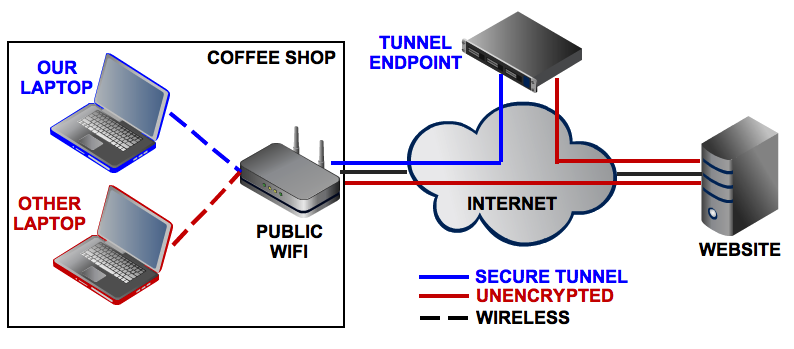
One of the worst online security mistakes you can make is to connect to an email, bank, or other sensitive account over public Wi-Fi. If that’s unavoidable—because you spend a lot of time in cafés, hotels, or airports, for example—paying for access to a virtual private network can significantly improve your privacy on public networks.
VPNs serve as an encrypted tunnel that prevents bad guys from getting between you and the Internet in order to steal your login credentials or other sensitive information.
You can use a free virtual private network client like OpenVPN to connect to a VPN service where you have an account, so you can browse the Web through an encrypted tunnel.
That’s a great reason to use a VPN, but it’s not the only one. Maybe you don’t want your Internet service provider to monitor your online activity at home. Normally when you connect online, your ISP can observe all of your activity. Over a VPN, however, your ISP can see only your connection to the VPN. As a bonus, many VPNs can help you bypass region blocks for sites like Amazon, Hulu, Netflix, and BBC’s iPlayer.
Not all service providers are created equal, however. Some VPN services log all of your browsing activity, thereby negating the point of using a VPN for privacy.
One solid VPN choice is Sweden-based IPredator, an $8/month service with ties to the infamous torrent-tracking site The Pirate Bay. That association may give you pause, but anonymity is clearly top-of-mind for the service. IPredator claims never to log any user traffic data, and you can even use PGP encryption when emailing IPredator support.
This diagram illustrates the difference between using an unencrypted connection and using a VPN-secured Internet connection at your average coffee shop.
Another popular choice in privacy-enthusiast circles is Private Internet Access, which similarly claims not to log any of your traffic. PIA is priced at $7 per month, or you can buy an entire year’s subscription for $40. PIA can help you beat region blocking in the United States, Canada, the U.K., and several countries in continental Europe.
Though VPNs are great for privacy, the ones I recommend here won’t prevent the companies behind destination websites like Facebook and Google from logging your browsing activity. Using your browser’s incognito mode won’t keep you completely anonymous, either, but it will block websites from reading the cookies and history stored in your browser to learn more about you.
Stop leaving private data in the cloud
Online file-syncing services such as Dropbox, Google Drive, and SkyDrive are among the best innovations to grace the Internet. But while the convenience of viewing your latest photos on Dropbox or of pulling text documents from iCloud may be fantastic, much of your data sits on company servers either unencrypted or protected with a layer of encryption beyond your control.
That means your data is available to law enforcement officials who obtain the right paperwork, regardless of how little objective justification they have for looking at your stuff. And any well-informed hacker can break into your account by using social engineering techniques, by discovering weaknesses in a company’s server security, or by conducting a brute-force attack that tries to guess your password.
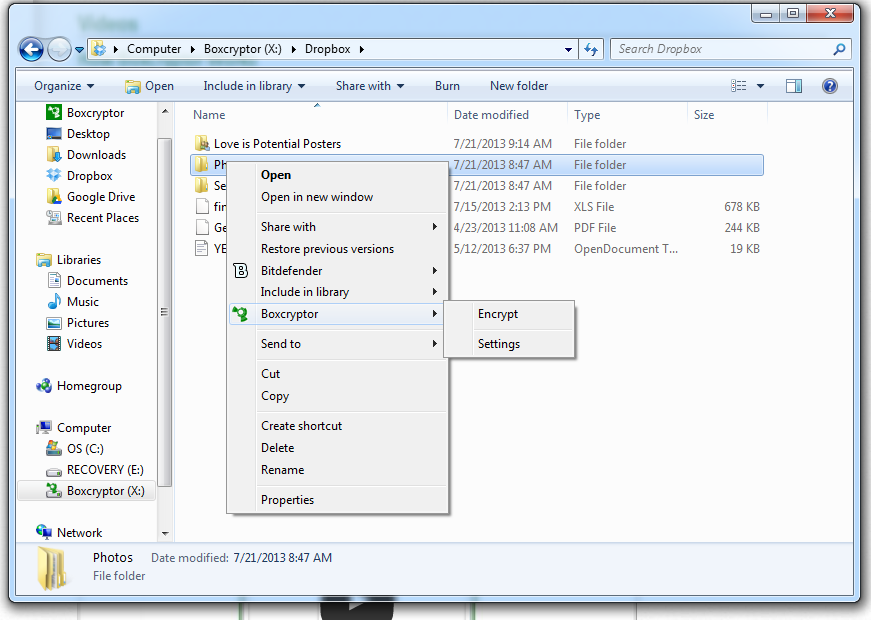
For sensitive data that you need to sync across devices, a better alternative is to use an encrypted cloud storage service. You can build one yourself by encrypting data on your PCbefore sending it to Dropbox, using free software such as BoxCryptor or the open-sourceTrueCrypt.
You can use a file encryption utility like BoxCryptor to encrypt files before storing them on remote storage services like Dropbox.
A far simpler method, however, is to find a file-syncing service that offers built-in storage encryption.
Two popular encrypted storage services are SpiderOak and Wuala (pronounced like voilà). Both services bill themselves as “zero-knowledge solutions,” meaning that they don’t know what you’re storing on their servers—and that they have almost no way of knowing, even if they wanted to. When you use SpiderOak, for example, the password you choose is factored into the encryption keys generated by the SpiderOak client. The only way for anyone, even a SpiderOak employee, to access your files—short of a quantum computer or a lucky guess—is by inputting your password. Password-building best practices dictate you should choose a phrase of at least ten characters that consists of an assortment of letters, numbers, and symbols.
The downside of services like SpiderOak and Wuala is that if you forget your password, you’re pretty much out of luck. Both companies say they have no way of retrieving your password and can provide only a password hint that you entered during the signup process.
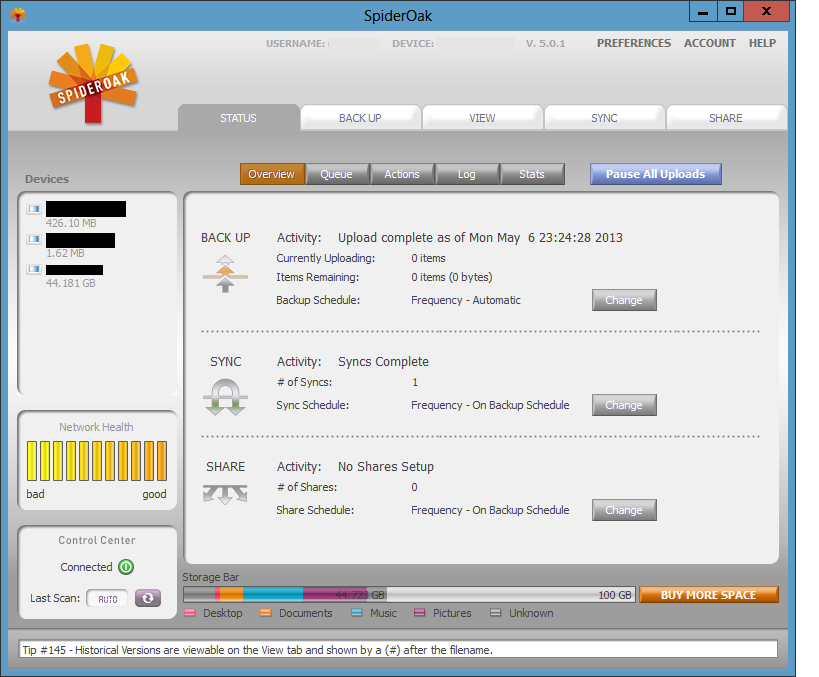
Despite the tight standard security, you can access your data on both services in a less secure way. If you log into your SpiderOak account from the company’s website or from a mobile device, your password gets stored in encrypted memory for the duration of your session. This is the only situation, SpiderOak says, where your data might be read by someone with access to its servers. For maximum privacy, you should access your files only via the SpiderOak desktop client.
Use SpiderOak's desktop client for maximum security.
Wuala claims to encrypt and decrypt your data on a mobile device similar to the way it handles the task on your PC. But when you share folders from Wuala using a Web link, the encryption key gets included in the URL. So anyone who receives the URL can view the contents of that folder, and the key has to be sent to Wuala’s servers for decryption. Wuala claims its service “forgets” the key after decryption, but that’s still one instance where using Wuala is less secure.
SpiderOak, based in Illinois, offers 2GB of free online storage, which should be enough for the mission-critical documents you need to sync across devices. If your storage needs are larger, try Switzerland-based Wuala, which offers 5GB free.
Both services provide back-up and Dropbox-like functionality. SpiderOak’s Hive sync sits on your PC as a special folder, while Wuala syncs to your PC as a network drive.
As is true of any online secure service, you have to be comfortable with the company and trust that the service is doing what it claims it is to keep your data secure.
Secure your online services with two-factor authentication
The first line of defense for keeping your online services secure is to use unique, random, passwords of ten characters or more for every account you have—just don’t forget to store them in a good password manager. For even better security, turn on two-factor authentication for Google, Facebook, and every other service that offers it.
Two-factor authentication requires you to enter a short numeric code in addition to your password before you can gain access to your account. The code usually comes from a physical fob or from a smartphone application. The good news is that you can get most of your two-factor authentication codes from Google’s Authenticator app for Android and iOS.
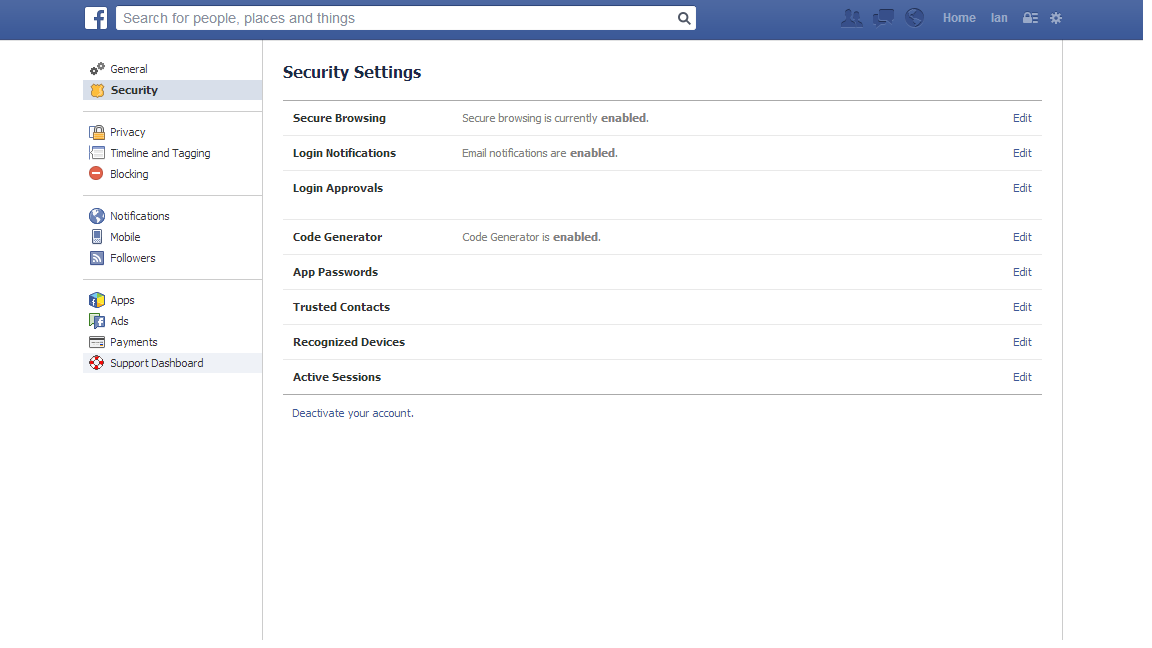
Authenticator automatically works with accounts such as Dropbox, Evernote, Google, LastPass, and Microsoft. Facebook offers its own code generator inside the social network’s mobile app, but you can add Facebook to Authenticator as well. From the Facebook newsfeed, click the settings cog in the upper right corner and select Account Settings.
On the next page, click Security in the left-hand navigation column. Under ‘Security Settings’ look for the ‘Code Generator’ menu option and click Edit to the far right of that option.
Click the link in the first two words of the sentence Set up another way to get security codes.
A QR code should appear in a pop-up window. Open Authenticator, navigate to the ‘Add Entry’ option, select Scan Barcode, and point your phone’s camera at the QR code on your monitor. In a few seconds, your phone will identify your Facebook account code and add it to Authenticator. Enter a Facebook code from Authenticator to ensure that everything’s working properly, and you’re done.
Two-factor authentication isn’t foolproof, but it does add a hurdle to help deter anyone who wants to get into your account. Twitter offers its own two-factor authentication, but its method is not compatible with Google’s Authenticator. The last time we checked, Twitter’s authentication method still had some kinks to work out.
If two-factor authentication isn’t enough security for you, take stock of the backup email address you use for all of your online accounts. Consider using one or several unique email addresses as password recovery addresses. Just make sure that you never give out these email addresses for personal mail and that they aren’t similar to your other accounts.
VPNs, encrypted storage, and two-factor authentication are great tools for keeping your data secure and your online activity as private as possible. They may sometimes be a bit of a pain to work with—especially when you’re entering extra codes in Authenticator. But dealing with a minor headache now is a lot easier than enduring the major migraine you’ll feel if you let yourself get hacked when you could have stopped the bad guys in their tracks.
Scientists have designed a revolutionary architecture that aims to make the internet more "social" by eliminating the need to connect to servers and enabling content to be accessed on a peer-to-peer basis.
The prototype, which has been developed as part of an EU-funded project called "Pursuit," is being put forward as a proof-of concept model for overhauling the existing structure of the internet's IP layer, through which isolated networks are connected, or "internetworked."
The Pursuit Internet would enable a more socially-minded and intelligent system, in which users would be able to obtain information without needing direct access to the servers content is initially stored.
Instead, individual computers would be able to copy and republish content on receipt, providing other users with the option to access data, or fragments of data,a wide range of locations rather than the source itself.
Essentially, the model would enable online content to be shared in a manner emulating the "peer-to-peer" approach taken by some file-sharing sites, but on an unprecedented, internet-wide scale.
That would potentially make the internet faster, more efficient, and more capable of withstanding rapidly escalating levels of global user demand.
It would also make information delivery almost immune to server crashes, and significantly enhance the ability of users to control access to their private information online.
While this would lead to an even wider dispersal of online materials than we experience now, however, the researchers behind the project also argue that by focusing on information rather than the web addresses (URLs)it is stored, digital content would become more secure.
They envisage that by making individual bits of data recognizable, that data could be "fingerprinted" to show that it comes an authorized source.
Technically, online searches would stop looking for URLs (the Uniform Resource Locator) and start looking for URIs (Uniform Resource Identifiers), explained Dr Dirk Trossen, a senior researcher at the University of Cambridge Computer Lab, and the technical manager for Pursuit.
In simple terms, these would be highly specific identifiers which enable the system to work out what the information or content is.
This has the potential to revolutionize the way in which information is routed and forwarded online.
Robotics engineer Taylor Alexander needed to lift a nuclear cooling tower off its foundation using 19 high-strength steel cables, and the Android app that was supposed to accomplish it, for which he’d just paid a developer $20,000, was essentially worthless. Undaunted and on deadline—the tower needed a new foundation, and delays meant millions of dollars in losses—he re-wrote the app himself. That’s when he discovered just how hard it is to connect to sensors via thestandard long-distance industrial wireless protocol, known as Zigbee.
1
It took him months of hacking just to create a system that could send him a single number—which represented the strain on each of the cables—from the sensors he was using. Surely, he thought, there must be a better way. And that’s when he realized that the solution to his problem would also unlock the potential of what’s known as the “internet of things” (the idea that every object we own, no matter how mundane, is connected to the internet and can be monitored and manipulated via the internet, whether it’s a toaster, a lightbulb or your car).
+
The result is an in-the-works project called Flutter. It’s what Taylor calls a “second network”—an alternative to Wi-Fi that can cover 100 times as great an area, with a range of 3,200 feet, using relatively little power, and is either the future of the way that all our connected devices will talk to each other or a reasonable prototype for it.
+
Flutter’s range is 3,200 feet in open air, but multiple Flutters can also cover even larger areas in a “mesh” network.Flutter
“We have Wi-Fi in our homes, but it’s not a good network for our things,” says Taylor. Wi-Fi was designed for applications that require fast connections, like streaming video, but it’s vulnerable to interference and has a limited range—often, not enough even to cover an entire house.
+
For applications with a very limited range—for example anything on your body that you might want to connect with your smartphone—Bluetooth, the wireless protocol used by keyboards and smart watches, is good enough. For industrial applications, the Zigbee standard has been in use for at least a decade. But there are two problems with Zigbee: the first is that, as Alexander discovered, it’s difficult to use. The second is that the Zigbee devices are not open source, which makes them difficult to integrate with the sort of projects that hardware startups might want to create.
Making Flutter cheap means that hobbyists can connect that many more devices—say, all the lights in a room, or temperature and moisture sensors in a greenhouse. No one is quite sure what the internet of things will lead to because the enabling technologies, including cheap wireless radios like Flutter, have yet to become widespread. The present day internet of things is a bit like where personal computers were around the time Steve Wozniak and Steve Jobs were showing off their Apple I at the Palo Alto home-brew computer club: It’s mostly hobbyists, with a few big corporations sniffing around the periphery.
+
Flutter radios connect to tiny Arduino computers, which is the de facto control and processing system for many startup and open source hardware projects.Flutter
“I think the internet of things is not going to start with products, but projects,” says Taylor. His goal is to use the current crowd-funding effort for Flutter to pay for the coding of the software protocol that will run Flutter, since the microchips it uses are already available from manufacturers. The resulting software will allow Flutter to create a “mesh network,” which would allow individual Flutter radios to re-transmit data from any other Flutter radio that’s in range, potentially giving hobbyists or startups the ability to cover whole cities with networks of Flutter radios and their attached sensors.
+
Taylor’s ultimate goal is to create a system that answers the fundamental needs of all objects in the internet of things, including good range, low power consumption, and just enough speed to get the job done—up to 600 kilobits a second, or about 1/20th the speed of a typical home Wi-Fi connection. One reason for that slow speed is that lower-bandwidth signals, transmitted in the 915 Mhz range in which Flutter operates, travel further. These speeds are more than sufficient when the goal is transmitting sensor readings, which are typically very short strings of data.